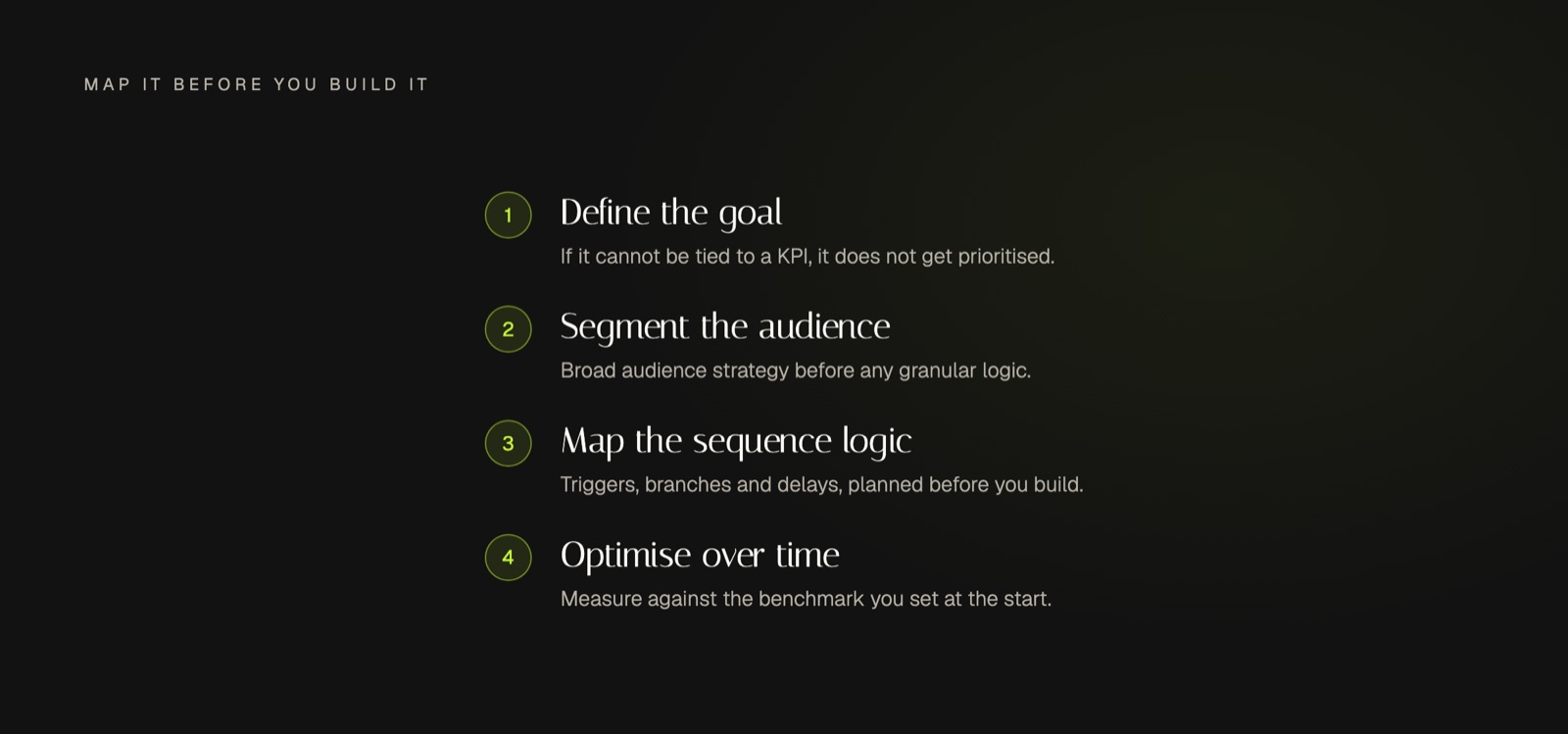
To build an effective email marketing automation workflow, you must first align it with a specific business KPI. Next, segment your audience based on behavior or demographics. Then, map out your sequence of triggers, actions, and content before launching and continuously optimizing with performance data.
Start with the End in Mind: Aligning Workflows to Business KPIs
Before you design a single email or set up a trigger, you must define the business goal your workflow will serve. An automation sequence without a clear objective is simply organized noise. Your primary goals, such as increasing qualified leads, improving customer retention, or boosting revenue, should be the filter for every project you undertake. If a proposed email marketing automation workflow cannot be directly tied to a measurable Key Performance Indicator (KPI), it should not be prioritized.
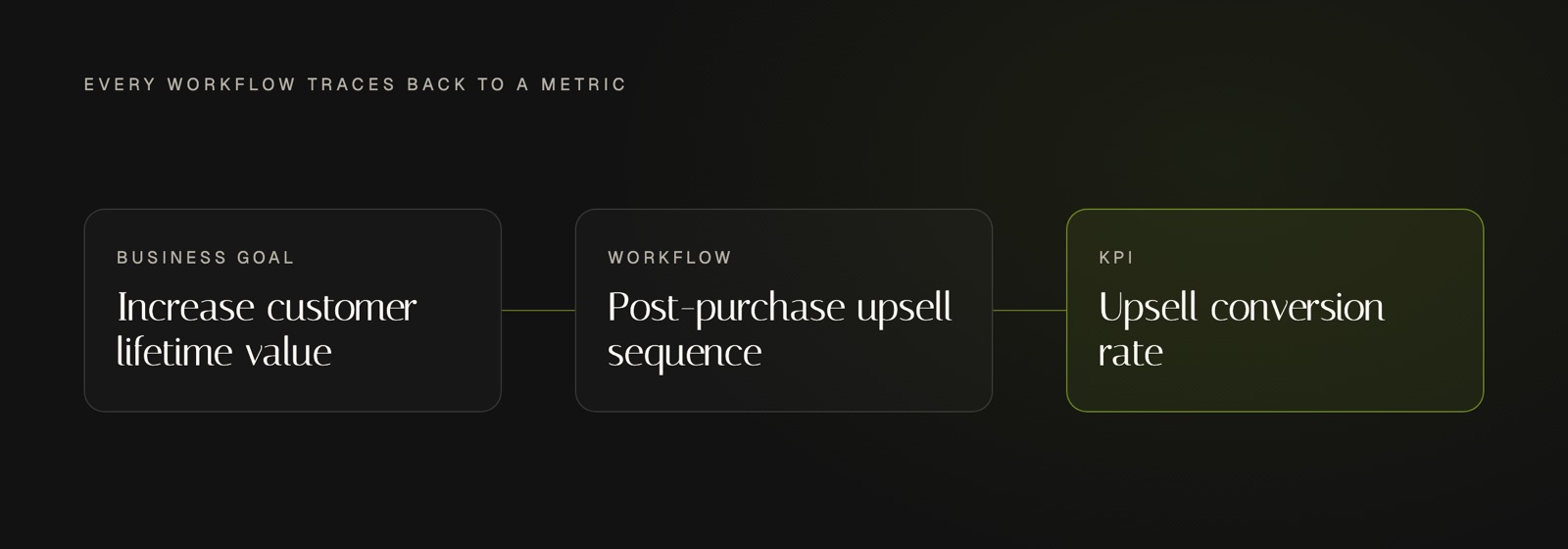
For example, if your overarching business goal is to increase customer lifetime value, a relevant workflow could be a post-purchase upsell sequence. The specific KPI would be the conversion rate on that upsell offer. This goal-first approach is a core component of the broader strategies we explore in our complete guide to workflow marketing automation. By defining success upfront, you create a clear benchmark to measure performance and justify the resources invested.
The Blueprint for Your Email Marketing Automation Workflow
Once you have a goal, you can begin constructing the workflow itself. This process moves from broad audience strategy to the granular logic of your automation platform. The key is to map everything out before you build, ensuring a cohesive and effective journey for your contacts.
Step 1: Foundational Audience Segmentation
Effective automation relies on sending the right message to the right person. Instead of creating one generic sequence for everyone, start by grouping your audience into meaningful segments. This ensures your automated messages resonate deeply and drive higher engagement. Base your segments on concrete data, such as:
-
Behavioral Data: Users who visited your pricing page but did not request a demo.
-
Purchase History: Customers who bought Product A but are prime candidates for the complementary Product B.
-
Engagement Level: Contacts who have opened your last five newsletters versus those who have been inactive for 90 days.
By creating separate, targeted automated journeys for each segment, you fundamentally increase the relevance of your communication and improve conversion rates.
Step 2: Mapping the Sequence Logic
With your segments defined, map the mechanical components of your workflow. This blueprint clarifies every step and interaction. For each workflow, you should be able to define the owner, tools, triggers, delays, and success metrics. The core logical elements include:
-
The Trigger: This is the event that enrolls a contact into the workflow. It could be anything from submitting a form to download an ebook, joining a specific list, or having a custom tag like "Engaged_Lead_2026" applied to their profile.
-
Actions and Delays: These are the steps in the journey. Actions include "Send Email," "Add Tag," or "Notify Team Member." Delays ("Wait 2 Days") are critical for pacing the communication and preventing your audience from feeling spammed.
-
Conditional Splits (If/Then): This is where your automation gets smart. Use conditional logic to create different paths based on a contact's behavior. For example: "Did the contact click the link in Email 1? If yes, send them the case study email next. If no, send them a follow-up email with a different subject line."
-
The Goal/Exit Condition: This is the event that successfully completes the workflow for a contact, removing them from the sequence. This could be booking a demo, making a purchase, or replying to an email. Defining this prevents you from continuing to nurture a lead who has already converted.
What is a lead nurturing sequence? A lead nurturing sequence is a series of automated emails designed to guide potential customers through your sales funnel. Instead of a hard sell, it focuses on building trust and providing value by delivering relevant content at strategic intervals, moving a lead from initial awareness to being sales-ready.
How Do You Optimize a Drip Campaign Over Time?
Launching an email marketing automation workflow is not the final step. The real value comes from continuous optimization based on performance data. Your goal is to refine the sequence to maximize its impact on the KPI you defined in the very first step.
Focus your analysis on key metrics for each email in the sequence: open rates, click-through rates (CTR), conversion events, and unsubscribe rates. A high open rate but low CTR on Email 2 might suggest a compelling subject line but uninspired email copy or a weak call to action. A high unsubscribe rate on Email 4 indicates that your message may be irrelevant or your timing is off.
Use this data to conduct systematic A/B tests. This is a fundamental practice in email marketing workflow automation. Test one variable at a time to get clean results. You can test subject lines, the core offer, email copy, or even the time delays between sends. According to Mailchimp's analysis, even simple A/B tests on subject lines can significantly lift engagement when done methodically. Over time, these small, data-driven improvements compound to create a highly optimized and efficient automation engine.
Frequently Asked Questions
How long should an email nurturing sequence be?
The ideal length depends entirely on the complexity of your sales cycle. For a straightforward SaaS trial sign-up, a sequence of 3-5 emails over one or two weeks may be sufficient. For a high-ticket B2B service, a nurturing sequence could last six to eight weeks and involve 7-10 touchpoints woven with valuable content.
What's the difference between a drip campaign and a nurturing sequence?
While often used interchangeably, a classic drip campaign is a linear, time-based series of emails (e.g., a 5-day welcome course). A lead nurturing sequence is more dynamic and intelligent. It uses conditional logic to send different messages based on user behavior within the same email marketing automation workflow, making it a responsive conversation rather than a static broadcast.
Can I build a workflow without a dedicated automation platform?
While basic email schedulers exist, a true workflow requires a platform with triggers, conditional logic (if/then branches), and integrations. Attempting to manage this process manually is not only impractical at scale but also defeats the purpose of automation, which is to provide timely, personalized communication with minimal manual effort.
Wrapping Up
Building a powerful email marketing automation workflow is a systematic process. It begins with strategic alignment to business goals, moves into the technical construction of segments and sequence logic, and lives on through continuous, data-driven optimization. It is not a "set and forget" tool but a dynamic asset that evolves with your audience's needs.
When you master this cycle of strategy, construction, and optimization, you create a scalable system that nurtures leads, engages customers, and drives revenue consistently. If you are ready to translate this framework into a fully implemented system for your brand, our team can help you map your Blueprint to build and scale your content presence.